Back to Article List

Jellyfin vs Plex now that remote streaming is paid

Jellyfin vs Plex now that remote streaming is paid - Jellyfin vs Plex now that remote streaming is paid

Updated and tested 2 November 2026

Plex changed its pricing three times in fourteen months. Remote streaming of your own library stopped being free in Plex's new apps on April 29, 2025 (Fire TV, smart TVs and consoles followed a year later). The Remote Watch Pass's introductory price ran out in June 2026, so renewals cost 50% more from then on, and the lifetime Plex Pass tripled on July 1, 2026. Jellyfin, the fork that split from Emby in December 2018, spent the same period shipping the 10.11 line and then 12.0, which arrived on 7 September 2026, and it still costs nothing on every platform it runs on. That's the backdrop to most "plex vs jellyfin" threads this year, and it's why the Jellyfin vs Plex comparison reads differently than it did in 2023, when the case for Plex was mostly polish and the case for Jellyfin was mostly principle.

This article covers the things that decide the choice for a library that lives on a server you rent: licensing and what the paid tiers gate, remote access, transcoding without a GPU, client coverage on TVs and phones, metadata, plugins and what each server sends to a third party. Both were checked against their own release notes and blog posts in late October 2026, and I ran Jellyfin 12.4 and Plex Media Server 1.43.5 side by side on a test VPS on 31 October 2026.

Jellyfin vs Plex comparison table

JellyfinPlex
LicenceGPL, source on GitHubProprietary, free server, paid Plex Pass
Current stable12.4 (26 October 2026)Rolling releases
Account requiredNo, users live on your serverYes, plex.tv account to claim the server
Remote playbackFree, you build it (reverse proxy, tunnel, VPN)Server owner's Plex Pass or per-viewer Remote Watch Pass since April 2025 (TVs and consoles since April 2026)
Hardware transcodingFree (QSV, NVENC, VA-API, AMF, VideoToolbox, RKMPP)Plex Pass
Live TV and DVRFree with a tuner or M3UPlex Pass
Offline downloads in mobile appsFreePlex Pass
TV apps in the storeSamsung (Tizen 6 and newer), LG, Roku, Fire TV, Android TV, XboxSamsung, LG, Roku, Fire TV, Apple TV, Android TV, PlayStation, Xbox
PluginsCatalogue in the dashboard, third-party reposThird-party plugin system wound down in 2018
Metadata and auth trafficMetadata lookups only, can be disabledAuth, metadata and Discover pass through plex.tv
Account breach noticesNone (no central accounts)August 2022 and September 2025

Licensing and what the paid tiers gate

Jellyfin is GPL-licensed C# with no paid tier, no account with the project and no feature behind a key. Hardware transcoding, live TV, SyncPlay, offline downloads in the mobile apps and every plugin in the official catalogue are on for every install. The project runs on donations. Current stable is 12.4 from 26 October 2026. Version 12.0 arrived on 7 September 2026 under that number rather than 10.12, and the 12.0 release post allows a direct upgrade from any 10.11.x release. Plugins built for 10.11 won't load on 12.0, and the migration rewrites the database on first boot, so the post calls a backup the only way back.
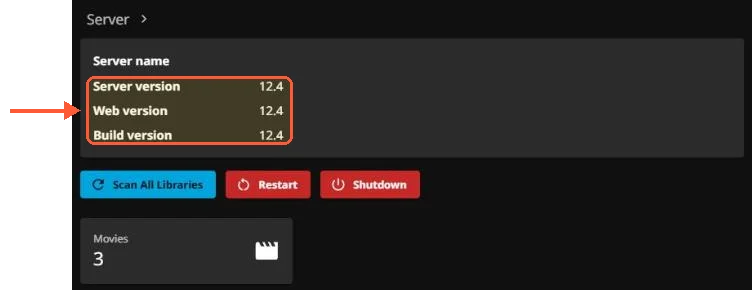
Jellyfin dashboard Server panel with Server version, Web version and Build version 12.4 and 3 movies

The Jellyfin dashboard on my test server: server, web and build version all read 12.4.

Plex Media Server is closed source and free to run, with Plex Pass as the paid layer. Hardware-accelerated transcoding, Live TV and DVR, downloads to mobile and, since April 2025, remote playback of personal media all sit behind it. Plex's own 2025 updates post spelled out the remote streaming rule: either the server owner holds a Plex Pass, in which case everyone they share with streams remotely at no extra cost, or each remote viewer buys a Remote Watch Pass. An update to the same post on April 29, 2026 extended the rule to Plex on Fire TV, smart TVs, PlayStation and Xbox. The original post also removed the old one-time mobile activation fee, so local playback in the Plex apps is free now, which is a real improvement for households that never leave the LAN.

Then the 2026 moves. On June 1 the introductory Remote Watch Pass pricing ended, so renewals now cost 50% more on both the monthly and annual terms. On July 1 the lifetime pass tripled. Plex's lifetime pricing announcement framed the new figure as reflecting "the real, ongoing value of the software" and said existing lifetime holders keep what they bought. Monthly and annual Plex Pass stayed where April 2025 left them. Prices aren't reproduced here because they moved three times between April 2025 and July 2026 and the plans page is one click away.

If you already hold a lifetime Plex Pass, none of this touches you, and the rest of this page is about features. For everyone else the question is what a decade of Plex Pass costs against a server that asks for nothing.
No surprises on your invoice

Every plan renews at the price you see, with unmetered bandwidth and no setup fees, so next month's bill looks the same.

Remote access without a relay

Plex handles remote access for you. The server registers with plex.tv, tries UPnP or a manual port forward and falls back to Plex Relay through Plex's own infrastructure when the port isn't reachable. Plex's relay page says streams through it are limited to 2 Mbps, so it works for a phone on mobile data and struggles with anything at 4K. The convenience is real, and it's also the piece that got paywalled in 2025.

Jellyfin has no relay and no account layer. Remote access is whatever you build: a port forward with a reverse proxy in front (the Jellyfin remote access guide covers the proxy and certificate), a Cloudflare tunnel for Jellyfin if you'd rather not open a port at all, or a VPN. On a VPS this is easier than it sounds because the machine already has a public IP, so the whole "remote" problem shrinks to "put a reverse proxy with a certificate in front of port 8096". There's no relay in the path, so nothing throttles the stream either.

Jellyfin's 10.11 notes deprecated the server's built-in TLS and planned its removal for the next major release. The 12.0 post says that removal has been postponed to a future version and still recommends a reverse proxy, so treat a reverse proxy as the supported path for a public Jellyfin.

Transcoding on a VPS with no GPU

Hardware transcoding is the feature most comparison tables score for Plex Pass and against free Jellyfin, and on a rented VPS it's the least relevant row in the table. Standard VPS plans have no GPU. Both servers fall back to software transcoding through their bundled FFmpeg, and neither has a meaningful CPU advantage in that mode, since jellyfin-ffmpeg and the Plex transcoder are both FFmpeg builds.

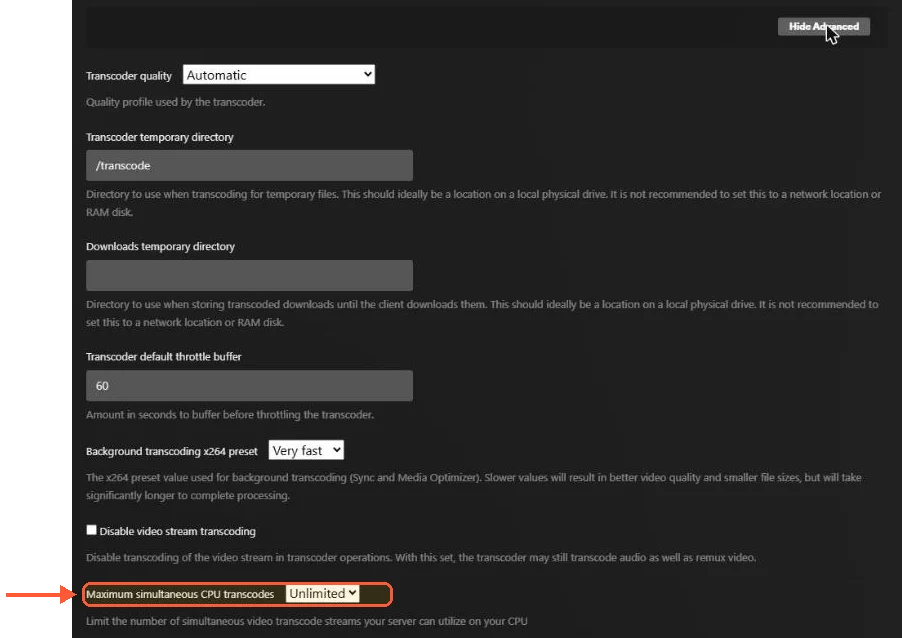
Plex advanced Transcoder settings with Maximum simultaneous CPU transcodes and no hardware acceleration setting

On my CPU-only server, with no Plex Pass, the advanced transcoder settings in Plex show no hardware acceleration option.

Where Jellyfin's position is better is on the day you do have a GPU. The Jellyfin hardware acceleration docs list Intel QSV, NVIDIA NVENC and NVDEC, AMD AMF on Windows, VA-API on Linux, Apple VideoToolbox and Rockchip RKMPP, all free, with hardware tone mapping of HDR10 and HLG to SDR. Plex covers a similar set behind Plex Pass. On a GPU server with an NVIDIA card passed through, NVENC works on either one. NVIDIA's video encode and decode support matrix lists 12 concurrent sessions for the GeForce cards it shows and "Unrestricted" for most professional RTX PRO rows, so check the row for your card.

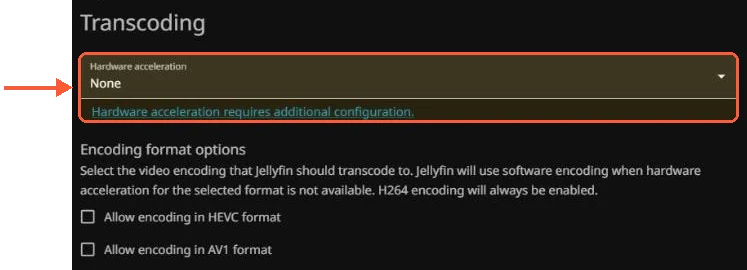
Jellyfin 12.4 Transcoding page with the Hardware acceleration dropdown and no subscription notice

Jellyfin 12.4 on the same server leaves the hardware acceleration menu open, with no key or subscription notice.

The practical advice on a CPU-only server is the same for both: keep the library in H.264 with AAC audio where you can, let clients direct play and treat transcoding as the exception you size the CPU for. Size the CPU for the number of software transcodes you expect at once, and expect that number to be small. Ten viewers all transcoding 4K at the same time won't happen on any VPS, and a Plex Pass wouldn't change that.

Client apps on TVs, phones and consoles

This is where Plex still leads and where the gap has narrowed most since 2023. Plex has native apps on Samsung and LG TVs, Roku, Fire TV, Apple TV, Android TV, PlayStation and Xbox, plus desktop and web. They look the same everywhere and they're in every store.

Jellyfin's official client list covers Android, iOS, Android TV and Fire TV, Roku, LG webOS, Samsung Tizen, Xbox, a desktop player and two Kodi add-ons. Two entries need a footnote. The Samsung app reached Samsung's TV app store in early 2026 and, according to the May 2026 State of the Fin post, it targets Tizen 6 and newer. Older sets can still sideload it, which the jellyfin-tizen README walks through. Press coverage at the time reported that the first rollout was partial, so some models didn't see it at once. There is no PlayStation client. On Apple hardware the strongest options are Swiftfin, the native app maintained inside the Jellyfin GitHub organisation, and Infuse, a third-party player with a free download and a paid Pro tier that talks to both Jellyfin and Plex. Jellyfin for Android shipped a rebuilt downloads experience in 2.7 (August 2026).

In practice a relative with a recent Samsung TV can find Jellyfin in the store now, an older set still needs the sideload, and Plex installs from the store on both in two minutes.

Metadata, library management and the 10.11 database change

Both scrape TMDB and TheTVDB, both handle collections and multiple versions of a film, both show trickplay thumbnails on the seek bar (Jellyfin's arrived in 10.9). Plex's metadata agents are more forgiving of messy file names. Jellyfin follows the naming conventions in its docs and is less forgiving when you don't.

Jellyfin 10.11 (October 2025) moved the library database from hand-written SQLite statements to EF Core. The 10.11.0 release post is blunt about the cost: you must be on 10.10.7 before upgrading, the migration can run for hours on a large library and the server now refuses to start with under 2 GB free in a data directory. Take the manual copy described in the Jellyfin backup and restore steps before starting it on an older install. The release also added a built-in backup and restore with snapshots, which Jellyfin had lacked for years. The 12.0 release changed the schema again, so the same backup habit carries over.

Plex's server database is SQLite as well, and it changes shape quietly between versions. You don't get asked and you don't get a migration screen, which is either a feature or the reason people keep two backups.

Plugins, intro skipping and live TV

Plex's extras are first-party: intro and credits detection, Plexamp, Discover and watchlists, mostly behind Plex Pass. Plex wound down its third-party plugin system in 2018. The closest replacement is the custom metadata provider API it announced in December 2025, which covers metadata only.

Jellyfin ships a plugin catalogue in the dashboard with metadata providers, LDAP authentication, Trakt scrobbling and Kodi sync. OIDC sign-in and the community Intro Skipper come from third-party repositories you add by URL. When the catalogue comes up empty after an upgrade it's usually a repository URL problem, and the Jellyfin plugin repositories not working fix is a one-line edit. Live TV and DVR need a tuner, an HDHomeRun on a LAN or an IPTV M3U on a VPS, and cost nothing.

Accounts, telemetry and the 2025 Plex breach

A Plex server needs a plex.tv account to claim it, and the apps sign in through plex.tv. Until that happens the server says so itself: on my test VPS its identity endpoint reported claimed="0".

curl http://localhost:32400/identity on a new Plex Media Server 1.43.5 returns claimed=0

My new Plex server reports itself as unclaimed until a plex.tv account signs in.

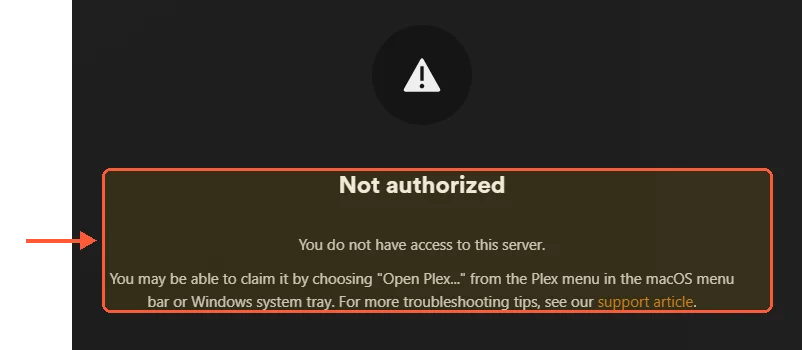
Claiming one on a VPS takes a detour, because the server isn't on your network. When I opened Plex Web from my own computer on port 32400, it asked me to sign in and then answered "Not authorized", and the claim page at plex.tv/claim showed me no code to put in PLEX_CLAIM.

Plex Web on port 32400 of an unclaimed remote server: Not authorized, You do not have access to this server

Opened from outside the server, Plex Web refused to let me claim it.

What worked was an SSH tunnel from my computer, so Plex Web sees the request as coming from the server itself:

ssh -L 32400:localhost:32400 root@your-server

With the tunnel open, browse to http://localhost:32400/web and sign in, and the server setup wizard follows (server name, access from outside your home, media folder). A fresh code from plex.tv/claim in PLEX_CLAIM before the container's first start is the other documented route, if the page gives you one.

Metadata, remote auth and the Discover features all pass through Plex's infrastructure. That's a design choice, and it's why the September 8, 2025 breach notice mattered: Plex told users that emails, usernames and hashed passwords had been accessed and asked everyone to reset and sign out all devices, as BleepingComputer reported, three years after a near-identical incident in August 2022. Nothing about anyone's media leaked; the logins did.

Jellyfin has no central account. Users exist on your server and authentication is local (or LDAP and OIDC through a plugin). A lost admin password is reset on the server itself, through the Forgot Password flow or, if that fails, a manual edit of jellyfin.db (see the Jellyfin forgot password procedure). The only outbound traffic is metadata lookups, which you can switch off per library. The trade is that every reset is your problem, and there's no email link to fall back on.

Make room for every file you'll ever keep

Keep your backups and media libraries on reliable storage with unmetered bandwidth and a cost that stays predictable as your archive grows.
Billing Cycle

VPS.H1

€6.20 Save  14 %
€5.32 Monthly
  • 1 vCPU AMD EPYC
  • 2 GB RAMMEMORY
  • 750 GB HDDSTORAGE
  • Unmetered bandwidth
  • IPv4 & IPv6IPv6 is currently unavailable in France, Finland or the Netherlands. included

VPS.H3

€22.18 Save  20 %
€17.74 Monthly
  • 4 vCPU AMD EPYC
  • 8 GB RAMMEMORY
  • 2500 GB HDDSTORAGE
  • Unmetered bandwidth
  • IPv4 & IPv6IPv6 is currently unavailable in France, Finland or the Netherlands. included

VPS.H4

€32.39 Save  18 %
€26.62 Monthly
  • 6 vCPU AMD EPYC
  • 12 GB RAMMEMORY
  • 3500 GB HDDSTORAGE
  • Unmetered bandwidth
  • IPv4 & IPv6IPv6 is currently unavailable in France, Finland or the Netherlands. included

*VAT excluded.

INCLUDED WITH EVERY PLAN

✓ No setup fees ✓1 Gbps network
✓ Free server monitoring ✓ Firewall management ✓24/7 support ✓ KVM virtualization

Jellyfin vs Plex on a VPS

Running either on a rented server changes the comparison in one direction. Remote access, Plex's strongest convenience, stops being a differentiator once the server has a public address. Hardware transcoding, Plex Pass's headline feature, is off the table on both without a GPU plan. What's left is client coverage, where Plex wins on TVs, against cost and control, where Jellyfin wins.

One consequence is specific to hosted Plex. On a VPS every client is remote, by definition, because none of them share a LAN with the server. A Plex server on a VPS with no Plex Pass streams to nobody unless every single viewer buys their own Remote Watch Pass. The free tier that works fine on a NAS at home doesn't exist once the server leaves the house.

The one-click Jellyfin VPS template installs Jellyfin as an app, so the install step is gone, and the manual route for Ubuntu and Docker is in how to install Jellyfin on a VPS. I run Jellyfin on a VPS for exactly that reason, and the two things that made me stop paying Plex were the remote streaming change and the breach notice landing in the same year.

Is Jellyfin better than Plex

For a server you rent, yes, and the margin got wider in 2026. Plex is still the better choice in two situations: a household full of Samsung TVs and PlayStations where nobody will sideload anything, and anyone who already holds a lifetime pass from before the increases. Outside those, you'd be paying a subscription for a relay you don't need, a transcoder you can't use without a GPU and an account system that has now had two breach notices. Jellyfin costs you a reverse proxy config and, once a year or so, a database migration you should back up for.

How the new Plex tiers behave on a shared server with dozens of remote users, where some viewers hold their own Remote Watch Pass and the owner doesn't, hasn't been tested for this article. If you run that setup, the sharing rules in Plex's support pages are the place to check before assuming everyone can still watch.

Questions?

Can I run Jellyfin and Plex on the same server against the same media folder?

Yes, and neither needs write access to the files. When I tested this, the same movies folder was mounted read-only into the Jellyfin and Plex containers, and both built their libraries from it while keeping their own databases in separate config directories. They listen on different ports (Plex on 32400, Jellyfin on 8096), so nothing collides; the rest of Jellyfin's ports are in the Jellyfin ports reference. Running both for a few weeks is a cheap way to test a move before you delete one.

About the author

Matteo De Luca

I am from Turin. I studied electronic engineering there and discovered, somewhere during the second year, that I enjoyed explaining our laboratory work more than I enjoyed the laboratory work itself. I wrote for small Italian technology sites during university, then took freelance assignments on consumer hardware and later Linux and server software. The second change was better for me. I like subjects where there is something concrete to understand before the writing begins.

I live with my girlfriend and a very old Syberian cat. I go bouldering two evenings a week and draw when I remember to. I also have a small collection of film cameras inherited from my grandfather. Photography is one of the few hobbies where I am quite happy not to become more efficient. I don't want every interest I have to become work.

Never run out of space again

Keep backups, archives and media on reliable storage with unmetered bandwidth and a cost per gigabyte that stays low as the years add up. Your first VPS comes with a 30-day money-back guarantee.