





.svg)
.svg)
.svg)
.svg)

.svg)
.svg)
.svg)


Updated and tested 22 October 2026
"Failed to retrieve local environment: failed to find local environment" is an unusual Portainer error, because for a long stretch of releases it often wasn't your fault at all. This one had a famous software cause with a version-shaped cure, plus two ordinary configuration causes that produce the same words. Which one you have takes about two minutes to determine, so let's determine it.
Check your version first (the 2.22 to 2.26 bug)
Between releases 2.22.0 and 2.26.x, Portainer shipped cleanup logic that went looking for a local Docker environment on every start and errored when it didn't find one, which hit setups with no local socket especially (agent-only and Kubernetes-only deployments) and plenty of normal ones besides. The maintainers confirmed the fix landed in 2.27 LTS after months of duplicate reports.
So: bottom-left corner of the UI (or docker logs portainer | grep version= when the UI won't cooperate; docker inspect only shows the tag, such as :lts) tells you your version. Anything in the 2.22-2.26 range, stop debugging your setup, because the odds say it isn't broken; update to the current LTS and the error very likely leaves with the old version. The safe four-command routine is our Portainer update guide, and this bug is incidentally the best argument that guide makes for staying on the LTS track, where this class of regression gets caught before it reaches you.

The starting Portainer line in the container log carries the version, 2.45.3 on my server.
Already on 2.27 or newer with the error still showing? Then yours is one of the two configuration causes, and they're both quick.
Cause two: the socket mount is missing
Portainer finds the local environment through the Docker socket mounted into its container. No socket mount means no local environment, and this exact error. Verify what your container was started with:
docker inspect portainer --format '{{range .Mounts}}{{.Source}} -> {{.Destination}}{{"\n"}}{{end}}'You're looking for the line /var/run/docker.sock -> /var/run/docker.sock. Absent means the run command that created this container skipped the -v /var/run/docker.sock:/var/run/docker.sock flag, and since mounts can't be added to a running container, the fix is a recreate with the full official command from the install guide (data volume survives, settings intact). This variant clusters in installs that were hand-typed from memory, which is most of my case for keeping the compose file where the flags can't be forgotten twice.

A healthy install shows two mounts: the data volume on /data and the Docker socket.
While you're in there, permissions occasionally masquerade as absence: the socket exists but the container can't read it, typical after hardened-docker experiments. ls -l /var/run/docker.sock on the host settles that in one line; root-owned with the docker group is normal and fine. Run it on the host: the Portainer image has no shell or ls, and docker exec portainer ls failed on my server with "executable file not found".
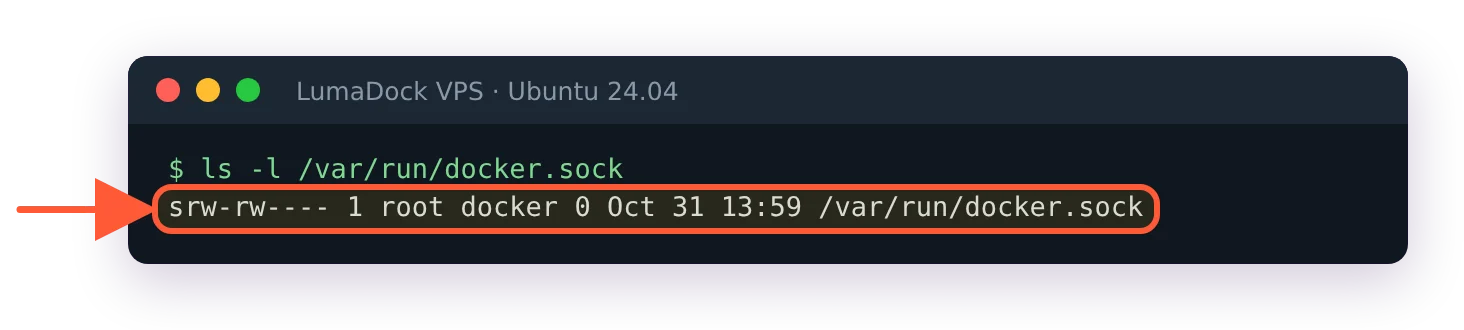
On the host the socket is owned by root with the docker group, the normal state.
Cause three: the environment record went stale
Environments are database records, and records can outlive reality: a reinstalled Docker engine, a restored volume from another machine, an agent that moved. When the version is current and the socket checks out, re-adding the local environment resets the record. In the UI: Environments, remove the broken local entry, then add a new one choosing the Docker socket option (in the 2.45 wizard it sits under More options, below the recommended Edge Agent), and the dashboard repopulates immediately since the containers themselves never went anywhere. Nothing about your running containers is touched by this; environment records are Portainer's map, not the territory.
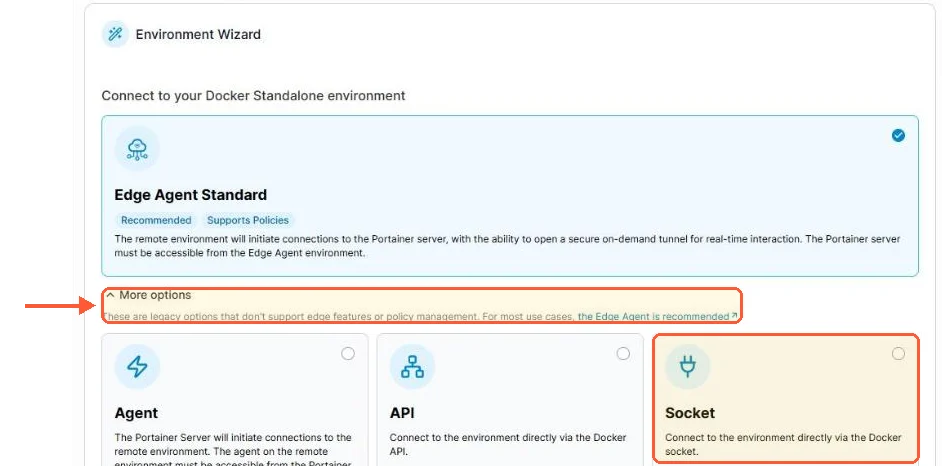
In the 2.45 wizard the Socket option for a local engine is one click away, under More options.
The stubborn last-resort variant, when even re-adding misbehaves: recreate Portainer with a fresh data volume (new volume name in the run command), accept the loss of settings and users, and re-add environments to a clean database. In several years I've needed that exactly once, after migrating a data volume between architectures, and I file it under "possible" rather than "recommended".
Verify the fix stuck
The dashboard shows the local environment with live container counts, the error stops appearing in docker logs portainer across a restart (restart it once deliberately to check, per the terminal restart guide) and stacks deploy again. If you fixed it by updating, note your version somewhere; the next time an error survives sensible debugging, checking the issue tracker for your exact version before rebuilding anything is the lesson this bug taught a few thousand people, me included.

