






.svg)
.svg)
.svg)
.svg)

.svg)
.svg)
.svg)

Webmin is a browser front end for the configuration files of a Linux server. You open port 10000 over HTTPS, log in with a system account and you get forms for Apache virtual hosts, BIND zones, MySQL users, Postfix maps, cron jobs, disk partitions and over a hundred other things. Press Save and Webmin parses the daemon's real config file, changes the lines you changed and writes it back. Remove Webmin tomorrow and the server carries on exactly as configured. It keeps no database of its own state, and nothing sits between the form and /etc/named.conf.
cPanel, Plesk and ispmanager are hosting control panels and they exist to sell hosting. They own the machine, they generate the configuration, they hand out accounts to customers and they expect every change to go through them from then on. Webmin doesn't want the machine. It edits the services you already run, on the box you already have, and it never asks to be the only way in.
Webmin releases and maintenance in 2026
People ask if Webmin is still maintained, usually because the last tutorial they found was written in 2014 and mentions apt-key. It is. The Webmin download page lists 2.670, released on 20 September 2026 and the version this guide was tested on, and before that 2.620 and 2.621 in January, 2.630 in March, 2.640 and 2.641 in May, 2.650 and 2.651 in June, 2.652 and 2.653 in July, then 2.660 in August. Roughly monthly, in other words.
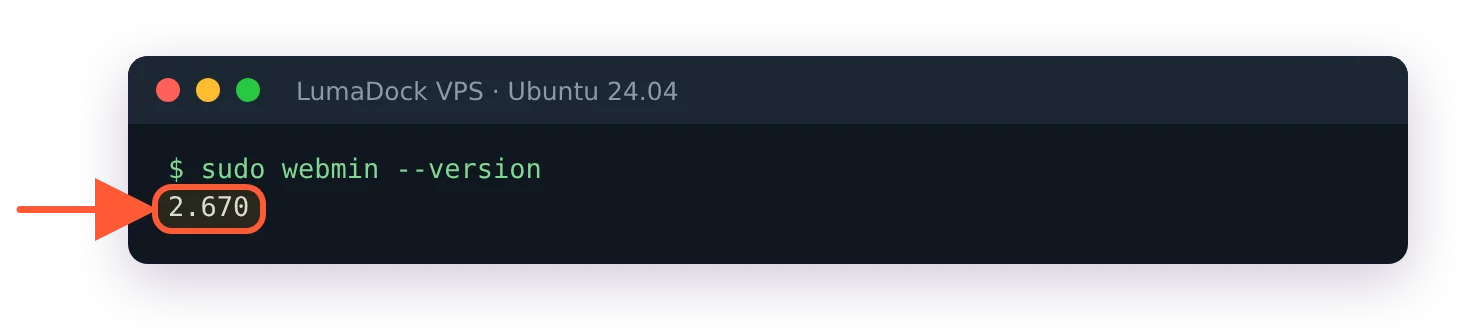
The version this guide was tested on.
Several of those releases carried real work. 2.650 brought three new modules: Systemd Services and Units, GRUB 2 Boot Loader and Kea DHCP Server, plus Alpine Linux support. 2.620 added support for the Ubuntu 26.04 development preview. Webmin is still free, under a BSD 3-Clause licence, with no open-core split and no community edition carve-out. Instructions in the rest of this guide stay version-neutral, since the 2.6x line moves quickly enough that a pinned point release would rot inside a season.
How to install Webmin
curl -o webmin-setup-repo.sh https://raw.githubusercontent.com/webmin/webmin/master/webmin-setup-repo.sh
sudo sh webmin-setup-repo.sh
That's the one official install route in 2026. The setup-repo script detects your distribution, writes the correct repository definition and imports the signing key, and your normal package manager takes over from there. It must run as root (without sudo it stops with must be run as root!), it asks Setup Webmin stable repository? (y/N) once, and it needs /usr/bin/curl present, which catches people on minimal images.
It takes --stable, --prerelease and --unstable, along with --force to skip the confirmation prompt. Stable is the default and it's what you want on anything real. The prerelease repo exists for testing a fix before it ships, and it belongs on a machine you can afford to break.
apt-get install webmin --install-recommends     # Debian family
dnf install webmin                              # RHEL family
The APT repository is a single flat suite called stable, with _all.deb packages, because Webmin is architecture-independent Perl. There's no bookworm, trixie or noble split. The same repo line works on Debian 11 through 13 and on every Ubuntu release, and there's no such thing as waiting for Webmin to support your distro version.
Installing Webmin on Ubuntu 24.04 and installing Webmin on Debian run the same script through the two Debian-family paths, and installing Webmin on AlmaLinux and Rocky Linux adds the dnf route with the firewalld step Debian users never hit. Distro-specific detail is where installs go wrong.
LumaDock's one-click Webmin template skips the repo step entirely and deploys with Webmin already running. It's built on Debian 12, so on that server the Debian guide is the one to follow from the login step on. Reinstalling over an existing install is a different exercise, because /etc/webmin survives a plain package removal and hands your old users and settings straight to the new install, which is covered in reinstalling Webmin cleanly. A fresh box needs none of that.
Why apt install webmin fails
Webmin isn't in Debian and it isn't in Ubuntu. The Debian package tracker states plainly that webmin is not part of any Debian distribution, and its news entry for the removal from testing is dated 26 January 2006. Twenty years, and half the internet still tells you to run apt install webmin on a clean system. What you get is E: Unable to locate package webmin, which is apt behaving exactly as designed.
Webmin login and port 10000
Webmin listens on https://YOUR_SERVER_IP:10000 with a self-signed certificate, so your browser will complain on the first visit. That warning is expected. What is not expected, at least by most first-time users, is that Webmin has no default username and password. Every credential-list site that tells you to try admin/admin is wrong. A stock install has one user, called root or admin, who authenticates against the system account of the same name. Where root has a password, root logs in with it; LumaDock's Ubuntu image ships that way. Where root is locked, as on a stock Ubuntu install, you log in as your sudo user with that user's system password, which works in both cases. sudo passwd -S root tells you which server you have: P means root has a password.
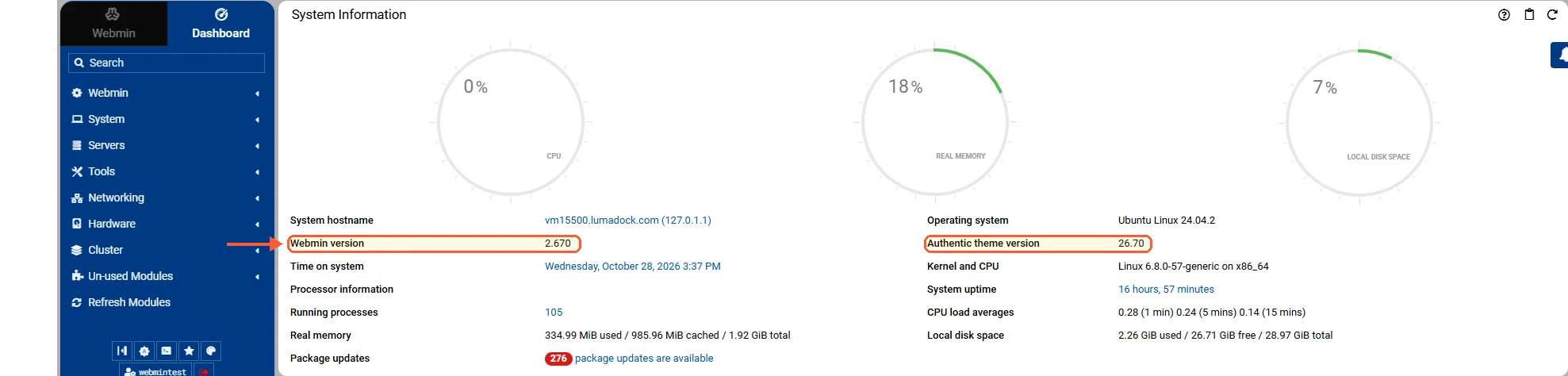
The dashboard after the first login, with the Webmin and Authentic versions.
The full set of cases sits in the guide to the Webmin default login and password, including the one where the account exists and nothing you type is accepted. If the page never loads at all, a firewall is the cause almost every time. Two layers need checking and people reliably forget the second one: the host firewall (UFW, firewalld or nftables) and the provider's network firewall in front of the machine. The opposite case is just as common. On LumaDock's Ubuntu 24.04 image UFW is inactive, so a fresh Webmin answers the whole internet on 10000 until you turn a firewall on.
Moving Webmin off 10000, binding it to one interface or putting it behind a reverse proxy is covered in changing the Webmin port from 10000. Replacing the self-signed certificate with a real one is a separate job, and a slightly odd one, because the tab you need is called SSL Provider and carries nothing with Let's Encrypt in the name.
Setting up a Let's Encrypt certificate for Webmin walks through the validation methods and the renewal interval, and common Webmin errors and how to fix them covers the rest of the first-hour failures, from a blank page to a service that starts and exits a second later. I haven't tried the DNS validation method on Webmin, so I don't know how it copes with a slow provider API.
Where Webmin keeps its files
The configuration directory is /etc/webmin on every distribution. Only the install directory moves: /usr/share/webmin on the Debian family, /usr/libexec/webmin on the RHEL family. Three files inside /etc/webmin carry most of the state. miniserv.conf is the web server config, holding keys like port, ssl, bind, sockets, allow, deny, certfile and keyfile. miniserv.users is the user database. config holds core and module settings, including the active theme. That split is why a removal and reinstall so often changes nothing: the new install picks the old /etc/webmin straight back up, certificates included.
The webmin command line
Webmin runs a persistent miniserv.pl daemon, a small Perl web server that stays resident. It isn't socket-activated, so it holds a little memory even with nobody logged in. The systemd unit is webmin.service, so systemctl restart webmin works normally, and the config directory carries helper scripts as well: /etc/webmin/restart, /etc/webmin/start, /etc/webmin/stop and /etc/webmin/restart-by-force-kill. After hand-editing miniserv.conf, run /etc/webmin/restart and not a plain reload, or your change sits on disk doing nothing while you wonder why the port didn't move.
Webmin also ships a CLI, which almost nobody knows about. It refuses to run as a non-root user. The documented subcommand list is short: no install-module and no version. One shortcut does exist that older guides deny, webmin restart, which works on 2.670 as well as the longer webmin server restart.
patch | Apply a commit, patch file or raw file to Webmin or a module |
passwd | Change a Webmin user's Unix or Webmin-only password |
disable-twofactor | Remove two-factor authentication from a Webmin account |
server | Start, stop, inspect or restart the Webmin service |
list-config | Read core or module configuration values |
set-config | Change a core or module configuration value |
enable-proxy | Prepare Webmin to run behind a reverse proxy |
disable-proxy | Re-enable Webmin's direct HTTPS service |
update-devel | Update a development checkout of Webmin, Usermin or Authentic Theme |
Two invocations cover most of it: resetting a password without touching the browser, and reading or writing a miniserv value without hand-editing the file.
webmin passwd --user root
webmin list-config --option port
webmin set-config --option port --value 10000
On Ubuntu and Debian the Webmin user is root; ask passwd for admin there and it answers that the user doesn't exist. set-config on a core option restarts Webmin for you. The same command with --module touches a module setting and restarts nothing, and that asymmetry bites. The server subcommand takes status, start, stop, restart, reload, force-restart, kill and stats, positionally or via -x. When you've no idea what's available on a given box, webmin --list-commands --describe prints the lot.
The command line reference documents the flags in full, including --config for source installs, where the CLI sits at /usr/share/webmin/bin/webmin or /usr/local/webmin/bin/webmin.
What the Webmin modules cover
The module index runs to around ninety entries, and a 2.670 package installs 115 module directories, across seven categories: Webmin, System, Servers, Tools, Networking, Hardware and Cluster. Most people install Webmin for Servers, with BIND, Apache, nginx, MySQL, PostgreSQL, Postfix, Dovecot, Samba, ProFTPD and Squid all editable through forms that map onto the underlying directives. System is where day-to-day system administration lands: users and groups, cron, filesystems, package updates, log rotation and now systemd units. Networking covers interfaces, routing and the firewall front ends for iptables, nftables and firewalld. The breadth is real, and for a mail server or a DNS server it saves genuine time, particularly for anyone who administers BIND four times a year and forgets the zone file syntax in between.
Webmin is Perl, which is why the packages are architecture-independent and why a module is a directory of CGI scripts you can open and read on the server without unpacking anything first. I've spent more time than I meant to reading those scripts to work out which form field maps to which directive, usually at the point where a form has written something into a config file that I wasn't expecting. They're more legible than I expected them to be.
Webmin and Docker containers exists because of a gap: Webmin 2.6x ships no Docker module and no Podman module, and there's no LXC module either. Not in the index, not in the official standard-modules directory. The third-party attempts on GitHub are small unreviewed projects, one of them self-described as work in progress, and none of them belongs on a production host. Even with Docker installed, Webmin's own search finds nothing for docker. What Webmin gives you for containers is Terminal, Command Shell, Custom Commands and, since 2.650, the Systemd Services and Units module for container units, which amounts to running docker commands through a browser.
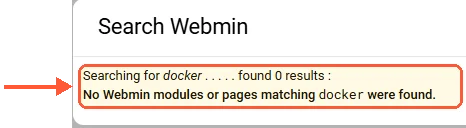
Webmin's own search finds nothing for docker, with Docker installed.
Changing the Webmin theme is straightforward, though there's only one theme under active development to change to. Authentic Theme is the default in 2.x, numbered to match Webmin's own releases, currently 26.70 from 20 September 2026. The old Framed theme still ships as a fallback if Authentic is missing, and the third-party theme index lists 22 entries whose newest non-Authentic additions date from March 2023. Nothing has been formally deprecated, so the index makes all 22 look equally alive.
Webmin security and the 2026 CVEs
Webmin runs as root, edits system config and speaks HTTP. The 2026 advisory list shows what that combination costs. Fixed prior to 2.640: a two-factor authentication bypass on the HTTP basic authentication path (CVE-2026-42210 and CVE-2026-56022), which let a login skip the second factor on an account with 2FA enabled. The same release fixed a privilege escalation through the Help feature that let untrusted users run commands as root regardless of their module access. Prior to 2.641 there was a stored XSS in the System and Server Status module via notification email templates, CVE-2026-22678, exploitable by a user with template permissions to compromise root. The same list carries more 2026 entries, among them a reflected XSS (CVE-2026-49243) fixed before 2.650, a server-side request forgery in Upload and Download and File Manager (CVE-2026-102337) fixed before 2.652 and a Custom Commands escalation to root fixed in 2.670. The hardening guide walks through the whole list.
Hardening a Webmin install has the practical steps, two-factor setup and referrer checks included. Every serious 2026 issue needed something first: a foothold as a low-privilege Webmin user, or a login page an attacker could reach. So patch on the monthly cadence instead of pinning a version, and keep port 10000 off the open internet using allow in miniserv.conf, the IP Access Control page, a VPN or an SSH tunnel. The full advisory history is published at webmin.com/security and goes back years, so you can judge the rate for yourself.

