Back to Article List

Portainer vs Docker and what each one does

Portainer vs Docker and what each one does

Updated and tested 30 October 2026

People type "portainer vs docker" because the two names appear together in every container tutorial, and it reads like a choice between two products. It isn't one. Docker is the engine that builds and runs containers, and Portainer is a web interface for that engine, itself delivered as a Docker container. You can run Docker without Portainer, and most servers do. You can't run Portainer without Docker (or Podman, or Kubernetes, which are the other engines it supports). The rest of this article is what each layer is responsible for, so the tutorials stop reading like a versus.

What Docker does and what Portainer adds

Docker Engine is three pieces: the dockerd daemon that runs containers, the REST API the daemon exposes on a Unix socket at /var/run/docker.sock, and the docker command-line client that talks to that API. Everything that happens to a container on a Linux server goes through that API, no matter which tool asked for it.
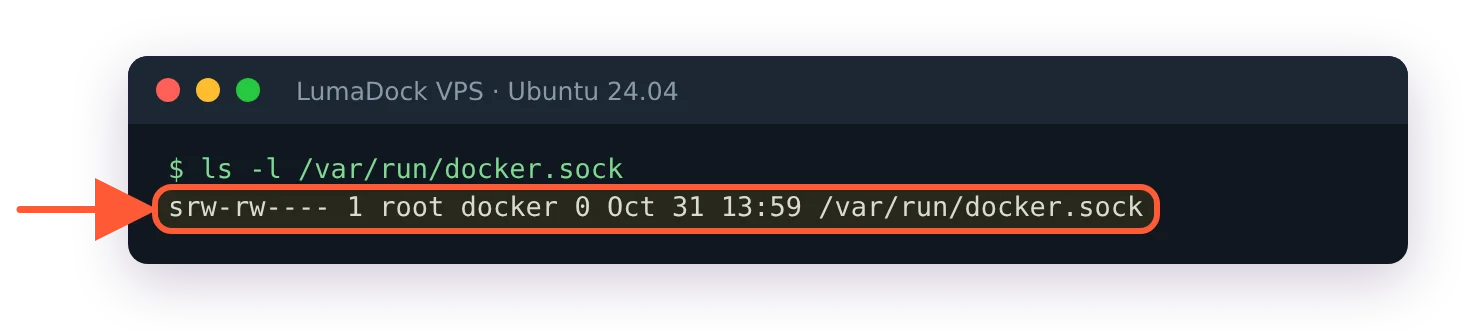
ls -l /var/run/docker.sock shows a socket file owned by root, group docker, mode srw-rw----

The daemon listens on a Unix socket owned by root and the docker group; the CLI and Portainer both connect here.

Portainer is one more client of the same API, with a browser in front of it. The install mounts the socket into the Portainer container, which is why the run command carries -v /var/run/docker.sock:/var/run/docker.sock, and from then on every screen in the UI maps to a call the CLI could also make. The container list is docker ps -a with buttons. The logs view is docker logs. Deploying a stack from a pasted compose file is docker compose up -d, run by Portainer on your behalf. Pulling an image, creating a volume, connecting a network: all things the daemon does, all reachable from either side. Delete the Portainer container and every other container keeps running, because Portainer never owned them. The daemon did.
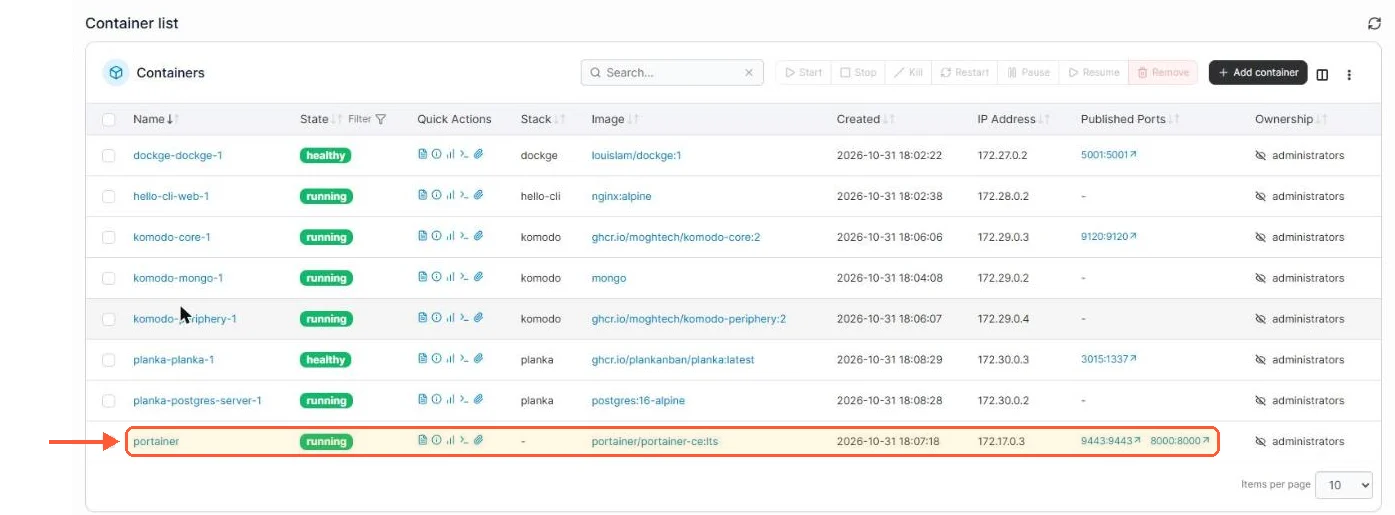
Portainer container list with eight containers, the portainer row publishing 9443:9443 and 8000:8000

The Portainer container list is docker ps -a with buttons, and Portainer itself is one of the rows.

docker inspect portainer lists two mounts: portainer_data at /data and /var/run/docker.sock at /var/run/docker.sock

Portainer reaches Docker through the socket mounted into its container, next to its own data volume.

What Portainer adds is everything the API doesn't have an opinion about. A login page and users, so a second person can see the server without an SSH key. Teams with access limited to one environment. App templates for one-click deploys of common services. Stacks pulled from a git repository, though CE 2.45 keeps redeploy webhooks for running stacks behind the Business licence. A single interface over several Docker hosts through its agent, plus Swarm and Kubernetes clusters in the same view. None of that is in the docker command and none of it is meant to be.

What stays on the command line is the daemon itself. Installing Docker, editing /etc/docker/daemon.json, restarting the service, changing the storage driver or the default log rotation and logging the host into a private registry with docker login are all outside Portainer's reach, because a client of the API can't reconfigure the process that serves the API.
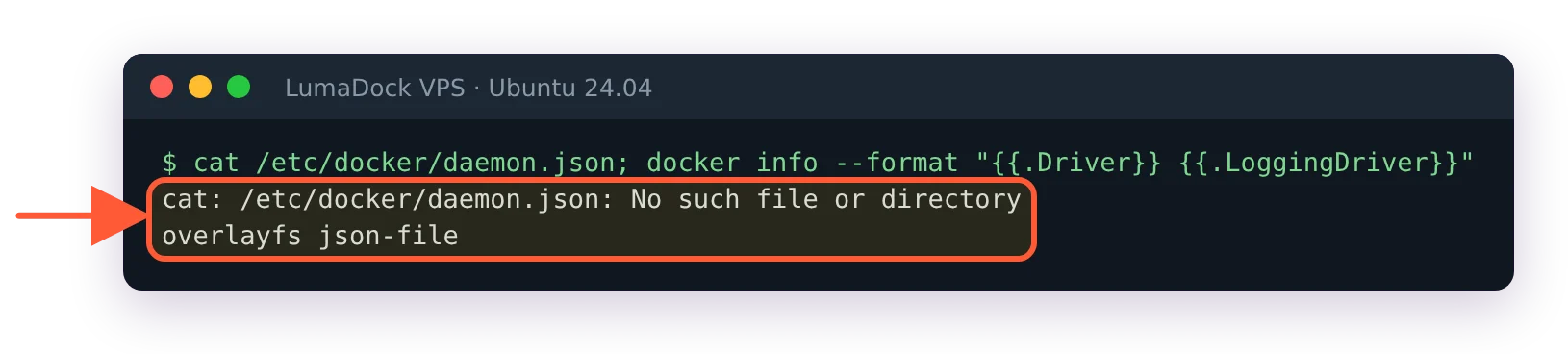
cat /etc/docker/daemon.json reports no such file; docker info shows overlayfs storage and json-file logging

A fresh Docker install has no daemon.json; storage and logging defaults are set on the host, not in Portainer.

The restart Portainer from the terminal guide is a good illustration: when the UI itself is broken, the fix is docker commands run over SSH. Keep an SSH key that works even when 9443 doesn't.


Your idea deserves better hosting

24/7 support 30-day money-back guaranteeRefund covers the VPS plan on your first order. Cancel anytime
Fatura Kesim Döngüsü

VPS.S1

28.66 RON Save  17 %
23.87 RON Aylık
  • 2 vCPU AMD EPYC
  • 2 GB RAMBELLEK
  • 30 GB NVMeDEPOLAMA
  • Sınırsız bant genişliği
  • IPv4 & IPv6IPv6 desteği şu anda Fransa, Finlandiya veya Hollanda'da mevcut değil. dahil

VPS.S3

71.71 RON Save  33 %
47.79 RON Aylık
  • 4 vCPU AMD EPYC
  • 6 GB RAMBELLEK
  • 70 GB NVMeDEPOLAMA
  • Sınırsız bant genişliği
  • IPv4 & IPv6IPv6 desteği şu anda Fransa, Finlandiya veya Hollanda'da mevcut değil. dahil

VPS.S4

95.63 RON Save  20 %
76.50 RON Aylık
  • 6 vCPU AMD EPYC
  • 8 GB RAMBELLEK
  • 80 GB NVMeDEPOLAMA
  • Sınırsız bant genişliği
  • IPv4 & IPv6IPv6 desteği şu anda Fransa, Finlandiya veya Hollanda'da mevcut değil. dahil

EPYC VPS.P1

43.01 RON Save  22 %
33.44 RON Aylık
  • 2 vCPU AMD EPYC
  • 4 GB RAMBELLEK
  • 40 GB NVMeDEPOLAMA
  • Sınırsız bant genişliği
  • IPv4 & IPv6IPv6 desteği şu anda Fransa, Finlandiya veya Hollanda'da mevcut değil. dahil
  • Ücretsiz otomatik yedeklemeGünlük, haftalık veya aylık çalışacak şekilde ayarlayabileceğiniz bir yedekleme alanı içerir.

EPYC VPS.P2

81.28 RON Save  24 %
62.14 RON Aylık
  • 2 vCPU AMD EPYC
  • 8 GB RAMBELLEK
  • 80 GB NVMeDEPOLAMA
  • Sınırsız bant genişliği
  • IPv4 & IPv6IPv6 desteği şu anda Fransa, Finlandiya veya Hollanda'da mevcut değil. dahil
  • Ücretsiz otomatik yedeklemeGünlük, haftalık veya aylık çalışacak şekilde ayarlayabileceğiniz bir yedekleme alanı içerir.

EPYC VPS.P4

143.47 RON Save  23 %
109.98 RON Aylık
  • 4 vCPU AMD EPYC
  • 16 GB RAMBELLEK
  • 160 GB NVMeDEPOLAMA
  • Sınırsız bant genişliği
  • IPv4 & IPv6IPv6 desteği şu anda Fransa, Finlandiya veya Hollanda'da mevcut değil. dahil
  • Ücretsiz otomatik yedeklemeGünlük, haftalık veya aylık çalışacak şekilde ayarlayabileceğiniz bir yedekleme alanı içerir.

EPYC VPS.P5

191.31 RON Save  25 %
143.47 RON Aylık
  • 8 vCPU AMD EPYC
  • 16 GB RAMBELLEK
  • 180 GB NVMeDEPOLAMA
  • Sınırsız bant genişliği
  • IPv4 & IPv6IPv6 desteği şu anda Fransa, Finlandiya veya Hollanda'da mevcut değil. dahil
  • Ücretsiz otomatik yedeklemeGünlük, haftalık veya aylık çalışacak şekilde ayarlayabileceğiniz bir yedekleme alanı içerir.

EPYC VPS.P6

286.99 RON Save  25 %
215.23 RON Aylık
  • 8 vCPU AMD EPYC
  • 32 GB RAMBELLEK
  • 200 GB NVMeDEPOLAMA
  • Sınırsız bant genişliği
  • IPv4 & IPv6IPv6 desteği şu anda Fransa, Finlandiya veya Hollanda'da mevcut değil. dahil
  • Ücretsiz otomatik yedeklemeGünlük, haftalık veya aylık çalışacak şekilde ayarlayabileceğiniz bir yedekleme alanı içerir.

EPYC VPS.P7

334.83 RON Save  29 %
239.15 RON Aylık
  • 16 vCPU AMD EPYC
  • 32 GB RAMBELLEK
  • 240 GB NVMeDEPOLAMA
  • Sınırsız bant genişliği
  • IPv4 & IPv6IPv6 desteği şu anda Fransa, Finlandiya veya Hollanda'da mevcut değil. dahil
  • Ücretsiz otomatik yedeklemeGünlük, haftalık veya aylık çalışacak şekilde ayarlayabileceğiniz bir yedekleme alanı içerir.

Genoa VPS.G2

119.55 RON Save  20 %
95.63 RON Aylık
  • 2 vCPUAMD EPYC Genoa 4. nesil 9xx4, 3,25 GHz veya benzeri, Zen 4 mimarisinde. AMD EPYC G4
  • 4 GB DDR5BELLEK
  • 50 GB NVMeDEPOLAMA
  • Sınırsız bant genişliği
  • IPv4 & IPv6IPv6 desteği şu anda Fransa, Finlandiya veya Hollanda'da mevcut değil. dahil
  • Ücretsiz otomatik yedeklemeGünlük, haftalık veya aylık çalışacak şekilde ayarlayabileceğiniz bir yedekleme alanı içerir.

Genoa VPS.G4

215.23 RON Save  22 %
167.39 RON Aylık
  • 4 vCPUKurumsal sunucu donanımında, ayrılmış vCPU çekirdeklerine sahip AMD EPYC işlemci. AMD EPYC G4
  • 8 GB DDR5BELLEK
  • 100 GB NVMeDEPOLAMA
  • Sınırsız bant genişliği
  • IPv4 & IPv6IPv6 desteği şu anda Fransa, Finlandiya veya Hollanda'da mevcut değil. dahil
  • Ücretsiz otomatik yedeklemeGünlük, haftalık veya aylık çalışacak şekilde ayarlayabileceğiniz bir yedekleme alanı içerir.

Genoa VPS.G6

430.51 RON Save  22 %
334.83 RON Aylık
  • 8 vCPUKurumsal sunucu donanımında, ayrılmış vCPU çekirdeklerine sahip AMD EPYC işlemci. AMD EPYC G4
  • 16 GB DDR5BELLEK
  • 200 GB NVMeDEPOLAMA
  • Sınırsız bant genişliği
  • IPv4 & IPv6IPv6 desteği şu anda Fransa, Finlandiya veya Hollanda'da mevcut değil. dahil
  • Ücretsiz otomatik yedeklemeGünlük, haftalık veya aylık çalışacak şekilde ayarlayabileceğiniz bir yedekleme alanı içerir.

Genoa VPS.G7

765.39 RON Save  22 %
597.95 RON Aylık
  • 8 vCPUKurumsal sunucu donanımında, ayrılmış vCPU çekirdeklerine sahip AMD EPYC işlemci. AMD EPYC G4
  • 32 GB DDR5BELLEK
  • 250 GB NVMeDEPOLAMA
  • Sınırsız bant genişliği
  • IPv4 & IPv6IPv6 desteği şu anda Fransa, Finlandiya veya Hollanda'da mevcut değil. dahil
  • Ücretsiz otomatik yedeklemeGünlük, haftalık veya aylık çalışacak şekilde ayarlayabileceğiniz bir yedekleme alanı içerir.

AMD Ryzen VPS.R1

81.28 RON Save  18 %
66.93 RON Aylık
  • 1 özel CPU AMD Ryzen 9 7950X, 4,5 GHz veya benzeri, Zen 4 mimarisinde. vCPU
  • 4 GB DDR5BELLEK
  • 50 GB NVMeDEPOLAMA
  • Sınırsız bant genişliği
  • IPv4 & IPv6 dahil IPv6 desteği şu anda Fransa, Finlandiya veya Hollanda'da mevcut değil.
  • Otomatik yedekleme dahil

AMD Ryzen VPS.R2

143.47 RON Save  17 %
119.55 RON Aylık
  • 2 özel CPU AMD Ryzen 9 7950X, 4,5 GHz veya benzeri, Zen 4 mimarisinde. vCPU
  • 8 GB DDR5BELLEK
  • 100 GB NVMeDEPOLAMA
  • Sınırsız bant genişliği
  • IPv4 & IPv6 dahil IPv6 desteği şu anda Fransa, Finlandiya veya Hollanda'da mevcut değil.
  • Otomatik yedekleme dahil

AMD Ryzen VPS.R4

526.19 RON Save  18 %
430.51 RON Aylık
  • 8 özel CPU AMD Ryzen 9 7950X, 4,5 GHz veya benzeri, Zen 4 mimarisinde. vCPU
  • 32 GB DDR5BELLEK
  • 400 GB NVMeDEPOLAMA
  • Sınırsız bant genişliği
  • IPv4 & IPv6 dahil IPv6 desteği şu anda Fransa, Finlandiya veya Hollanda'da mevcut değil.
  • Otomatik yedekleme dahil

*VAT excluded.

INCLUDED WITH EVERY PLAN

✓ No setup fees ✓1 Gbps network
✓ Full root access on KVM ✓ Free server monitoring ✓ Firewall management ✓24/7 support

Install order: Docker first, then Portainer

Install Docker Engine on the server following the Docker Engine install guide for Ubuntu (or the page for your distribution), then confirm the daemon answers:

docker version
docker run --rm hello-world

Then create a volume for Portainer's data and start it:

docker volume create portainer_data
docker run -d -p 8000:8000 -p 9443:9443 --name portainer --restart=always \
  -v /var/run/docker.sock:/var/run/docker.sock \
  -v portainer_data:/data portainer/portainer-ce:lts

Ports 9443 and 8000 are the defaults, 9000 is the older plain HTTP port, and the Portainer ports article explains which of them you can close. Open https://YOUR_SERVER_IP:9443, enter the one-time setup token that new installs print in the container logs (docker logs portainer) and create the admin user. That has to happen within five minutes of the container starting or the setup page locks and the container needs a restart, a detail covered with the rest of the walkthrough in how to install Portainer. Everything after that happens in the UI.

On LumaDock, the Portainer VPS template is a one-click way to get Portainer CE onto a new server, so there's no manual install. Either way, the relationship is the same on every server: the daemon runs the containers, and Portainer is one of them.

One more source of the confusion is Docker Desktop. On a Mac or Windows laptop, Docker Desktop bundles the engine with its own graphical dashboard, so a developer coming from a laptop already has a UI and wonders what Portainer is for. On a Linux server there's no Desktop and no dashboard, only the daemon and the CLI, and that's the gap Portainer fills. Portainer also publishes a Docker Desktop extension, which is the same UI running inside Desktop for people who want it on the laptop too.

Questions?

What is the difference between Docker Compose and Portainer?

Docker Compose is the command-line tool that reads a compose.yaml and creates the containers, networks and volumes it describes, while Portainer is a web interface that can deploy the same file as a stack. A project you start with docker compose up -d still shows up in Portainer as a stack with Limited control, and on my test server only the stack created through Portainer got Total control. In practice each project has one owner: you edit it in Portainer, or you keep it as files you run from the shell.

Ellie Grace Hayes
About the author

Ellie Grace Hayes

I grew up in Minnesota and started working remotely before I decided that travelling was going to become a permanent part of my life. And it kinda did, more or less... I tend to stay somewhere for a month or two, sometimes longer if I like the place (so "digital nomad" is technically accurate, even if most days are much less exciting than the term suggests). Usually I'm at a desk in a rented room trying to work out why a command behaved differently on two supposedly identical machines :)

I came into technical writing through support work & community tutorials. Linux was the first subject I wrote about, but since then I've wandered into containers, hosting, networking plus a lot of self-hosted software. I've played Minecraft since I was a kid and still go through phases where I get completely absorbed in it for a few weeks. I don't have a five-year plan. I've tried - it keeps becoming a six-month plan instead.

Deploy your next project in seconds

Bring your winning ideas online faster, with modern hardware and unmetered bandwidth. Join a European cloud trusted by thousands of developers and businesses worldwide.